

LONGgains when the price rises.SHORTgains when the price falls.
YES or NO side, their prices are in dollars, and leverage can multiply both gains and losses. A leveraged position can be closed by the exchange (liquidated) before your strategy’s exit is reached. Use Simulate before Run Live.
Find a perp
Open Market in the left panel, then choose Perps.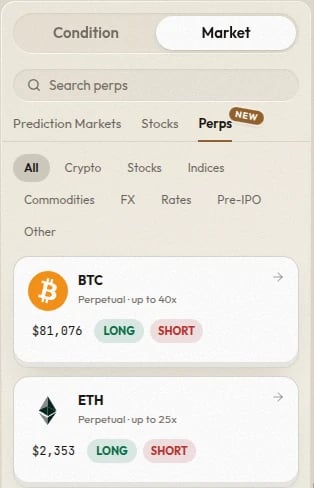
- Use Search perps to search by ticker or name.
- Use the category chips to narrow the list: Crypto, Stocks, Indices, Commodities, FX, Rates, Pre-IPO, and Other. Only categories that currently have perps appear.
- The ticker, such as
BTCorNVDA. - Perpetual · up to Nx, the most leverage the asset allows.
- The live price in dollars. A card that shows unavailable cannot be added until a price is available.
- A green
LONGand a redSHORTbutton.
Crypto perps and other assets
Crypto perps, such asBTC, ETH, and SOL, trade on Hyperliquid’s own market.
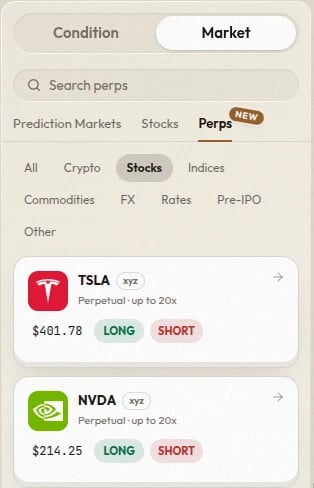
Stocks, indices, commodities, FX, rates, and pre-IPO names are listed on Hyperliquid by other providers. Their cards carry a small badge with the provider’s name, such as xyz, para, io, or mkts. Hover over the badge for the provider’s full name. Check what one of these perps tracks before you trade it; for example, a rates perp follows an interest rate.
Add a perp to a strategy
- Click or drag the card to add a
LONGaction. - Click or drag the
SHORTbutton to add aSHORTaction, or theLONGbutton for a long.
LONG and SHORT buttons on the action node.
Set the leverage
The action node has a leverage button next to its amount. It starts at1x, which means no leverage. Click it and type or drag a whole number up to the asset’s maximum. The panel shows Up to Nx on this asset.
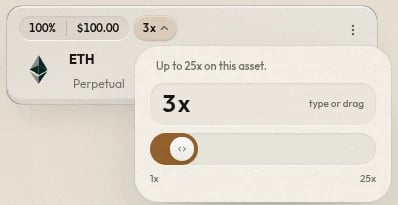
$100 at 3x opens a $300 position: a 10% move in the price changes its value by about $30.
Exit a perp position
A strategy closes a perp position in one of three ways:- An Exit node after a condition closes the position and returns the margin, plus or minus your profit or loss, to the strategy.
- Hold keeps the position open while the strategy waits for a later condition.
- When the strategy finishes, any perp position still open is closed automatically.
Watch a perp with a condition
Use a Price Condition and choose the perp as the market to watch. The threshold is a price in dollars, such as “if BTC is less than$80,000.” The condition watches Hyperliquid’s price for the perp.
A perp has no close time and never resolves, so a Time Condition or Resolution cannot watch one.
For a short, a stop-loss is a price above where you entered. For a long, it is a price below.
Costs and risks
- Minimum order. Each perp order needs at least
$10of position size: the amount times the leverage. A branch that would open less than that is skipped and no order is placed. Raise the allocation or the leverage. Closing a whole position is exempt. - Funding. While a position is open, it pays or receives funding every hour. When the funding rate is positive, longs pay shorts; when negative, shorts pay longs. On a position held for days, funding can add up to more than the price move.
- Liquidation. If the price moves too far against a position, the exchange closes it and the margin backing it is lost. A stop-loss set beyond the liquidation price never runs. How far the price can move depends on the kind of perp:
- A stock, index, commodity, FX, rates, or pre-IPO perp is backed only by its own margin. It is liquidated after a move of roughly
1 ÷ leverageagainst you: about 33% at3x, 10% at10x. - A crypto perp shares its margin with the rest of your Hyperliquid balance and your other open crypto perp positions. Its liquidation price depends on all of them, not on leverage alone, so the
1 ÷ leverageestimate does not apply. A losing crypto position can also draw on that shared balance, not just its own margin. The CLI’sperps positionscommand reports each position’s actual liquidation price.
- A stock, index, commodity, FX, rates, or pre-IPO perp is backed only by its own margin. It is liquidated after a move of roughly