

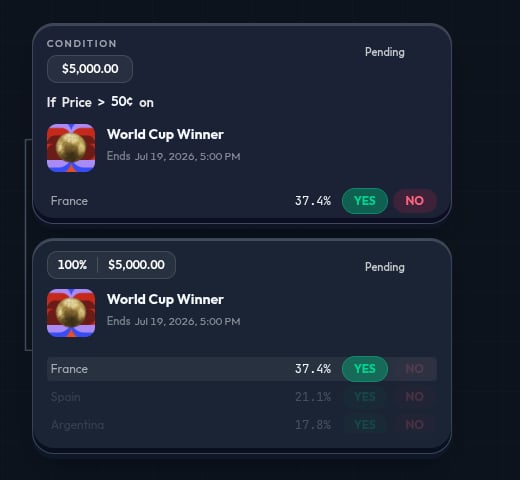
Wait for a price threshold
Use this when you want a selected side to reach a specific displayed price before you buy.- Add a Price Condition.
- Set the watched market, side, comparison, and threshold, such as greater than
60¢. - Add a market action for the side you want to buy.
- Confirm the action has a
100%allocation. - Run a simulation.
Continue after a market action
Use this when one market action should lead to another rule.- Add a market action.
- Add a condition below that action.
- Configure the condition for the next price, time, or resolution check.
- Add the next action after the condition.
- Run a simulation.
Act at a time
Use this when the timing of a market matters.- Add a Time Condition.
- Choose before-close timing or a specific time.
- Add the market action that should follow.
- Check the market close time and the trigger value.
- Run a simulation.
Split between a market and Wallet
Use this when one condition should direct the available amount to more than one action.- Add a condition.
- Add a market action and Wallet after that condition.
- Set allocations, such as 70% to a market action and 30% to Wallet.
- Confirm the total is
100%. - Run a simulation.
Hold before another check
Use this when you want to keep a market position open and wait for a later rule.- Add a market action for the side you want to hold.
- Add a Time Condition or Price Condition below that action.
- Add Hold after the later condition.
- Confirm Hold keeps the position or wallet allocation you expect.
- Run a simulation.
Continue after resolution
Use this when the final result of one market decides what happens next.- Add Resolution and select the market to resolve.
- Create the
YESpath and add the action it should take. - Create the
NOpath and add its action. - Review both paths. Each should make sense if that result occurs.
- Run a simulation.
Choose a grouped event outcome
Use this when an event card lists mutually exclusive named outcomes, such as teams or candidates.- Open Market and find the grouped event.
- Select one named outcome, such as Team A.
- Choose
YESorNOfor that exact outcome. - Add a Price Condition first if you want to wait for a threshold.
- Run a simulation and confirm the selected named outcome on the canvas.
NO means that outcome does not happen; it does not pick a different outcome for you.
Use a recurring market
Use this for a repeated market family, such as a short time-window market.- Open Market.
- Choose Recurring.
- Pick a time family such as 5m, 15m, 1h, 4h, or daily.
- Choose the active market window and side.
- Add a condition if the market action should wait for a rule.
- Run a simulation.
Before every simulation
- Read each market question and resolution rule.
- Confirm every named outcome and
YESorNOside. - Confirm every price, time, or result rule.
- Confirm allocations in every split total
100%. - Confirm every condition that should move funds has a follow-up action.