

Use the Market tab
Open Market in the left panel.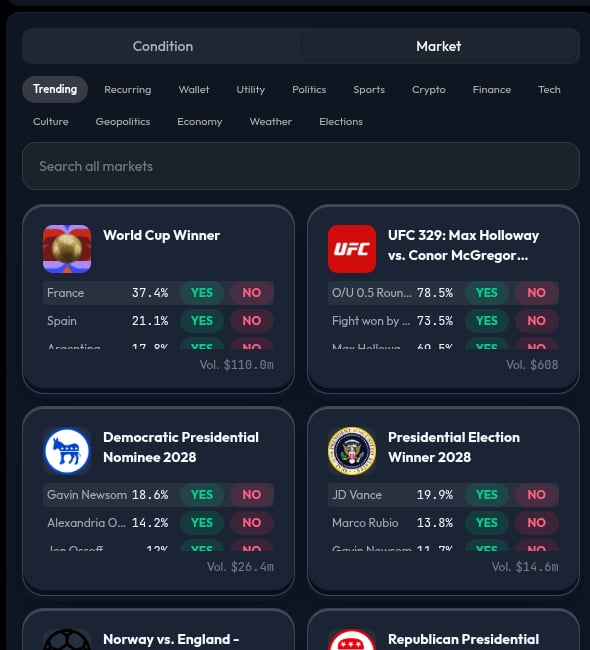
- Trending for active markets.
- Recurring for markets that repeat.
- Topic categories such as Politics, Sports, Crypto, Finance, Tech, and Weather.
- Search when you know what you want.
Read a market card
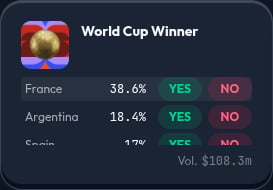
- The market question.
- One or more outcomes.
YESandNObuttons.- A displayed price for each side.
- Volume information.
Choose an outcome and side
Some market cards contain several named outcomes. For example, a card may list several teams or people. In that case, make two choices:- Select the named outcome you mean.
- Select
YESorNOfor that outcome.
YES means you choose the side for that named outcome happening. NO means you choose the side for that named outcome not happening. Read the market question and its resolution details before choosing either side.
Grouped events and NegRisk markets
Some events group mutually exclusive named outcomes in one card. You may see this called a NegRisk market. It is a convenient way to compare related outcomes, such as several teams, candidates, or award nominees.
For example, if you select Team A,
YES means Team A wins. NO means Team A does not win; it does not mean Team B wins unless you select Team B separately.
Search for a market
Use the search box to narrow the list. Search by topic, team, asset, person, or event. If you cannot find the right market, do not use a similar-looking one unless you understand how it resolves.Tokenized stocks
The Stocks category in the Market tab lists tokenized stocks on Base: real equities such as Tesla, NVIDIA, and Apple wrapped as tokens (TSLAc, NVDAc, AAPLc). They are not prediction markets, and they behave differently in a strategy:- A stock has no
YESorNOside. You either hold it or you do not, so a stock action simply buys it. - Its price is in dollars per share, not cents or a probability. A price condition on a stock uses a dollar threshold, for example “if TSLA crosses above $400”.
- It is bought and sold as a token swap on Base rather than as a Polymarket order, so the price you pay is the pool’s price, which sits slightly above the reference share price. The card shows both.
- A stock never resolves. A resolution condition cannot watch it, and a stock you still hold when the strategy finishes is sold at that point.
- Tokenized stocks are not offered in every region. If they are unavailable where you are, a strategy that buys one cannot be run live.
Add a market action to the canvas
For a prediction market, selectingYES or NO prepares the card; a tokenized stock card has no side and is added directly. Click the card to add the selected market action, or drag the card to choose a position on the canvas.
When the card appears on the canvas, verify the market, named outcome, selected side, and allocation. The action defaults to 100% when it is the only action in its decision.
Before you add a market
- Make sure the market question matches your idea.
- Check how and when the market closes or resolves.
- Confirm the displayed side is the one you intend to buy.
- Do not substitute a similar-looking market if you do not understand its resolution.