

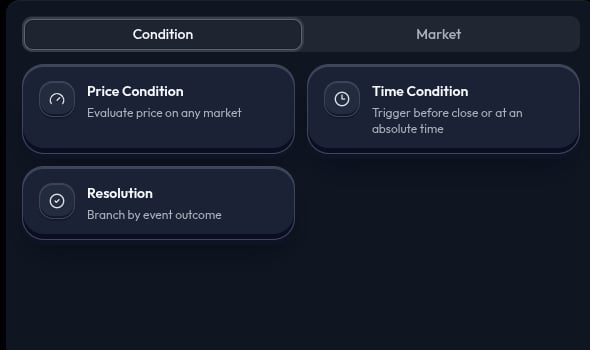
Add a condition
Open Condition in the left panel. Click a card to add it at the current position, or drag it to place it before, after, or below another node. Configure the node after you add it.Compare conditions
Price Condition
Use Price Condition when a selected market side must reach a price before the strategy continues. Choose the market and side to watch, then set the comparison and threshold. Depending on your strategy, it can watch the market you are about to trade, a market from an earlier step, or another market you select. Examples:- “If the selected
YESside is greater than60¢, continue.” - “If the selected
NOside is less than40¢, continue.”
> and < produce opposite behavior. A displayed market price is not a guarantee that an action will execute at that exact price.
If you add more than one rule to the same condition, every rule must be met. For example, you can wait for a YES side to reach 60¢ and for the market to be within ten minutes of close.
A price condition can also watch a tokenized stock. The threshold is then a share price in dollars rather than a probability: “if TSLA is greater than $400, continue.” The condition watches the stock’s reference price feed, which sits slightly below the pool price a trade pays.
Time Condition
Use Time Condition when the strategy should continue before a market closes or at a specific time. Choose the market first, then set the timing mode and value. Examples:- “Continue 10 minutes before the selected market closes.”
- “Continue at the chosen date and time.”
Resolution
Use Resolution when the next step depends on a selected market outcome. The node branches according to the outcome that resolves. Examples:- “If the selected outcome resolves
YES, continue to this branch.” - “If it resolves
NO, continue to the other branch.”
Before you run
Choose the right condition
Ask yourself:- Do you need a price threshold? Use Price Condition.
- Do you need a time trigger? Use Time Condition.
- Do you need to branch after an outcome resolves? Use Resolution.
Common mistakes
- Watching the wrong market or side.
- Reversing a price comparison.
- Treating market close and market resolution as the same moment.
- Entering a probability where a stock condition expects dollars. A stock threshold of
0.6means sixty cents a share, not 60%. - Using Run Live before testing with Simulate.