> ## Documentation Index
> Fetch the complete documentation index at: https://docs.miramarket.org/llms.txt
> Use this file to discover all available pages before exploring further.
# Strategy templates
> Start from a ready-made strategy and fill in your own markets.
A template gives you a strategy's condition and action shape without building it node by node. Use one to start faster, then review and edit before you run it.
 ## Start from a template
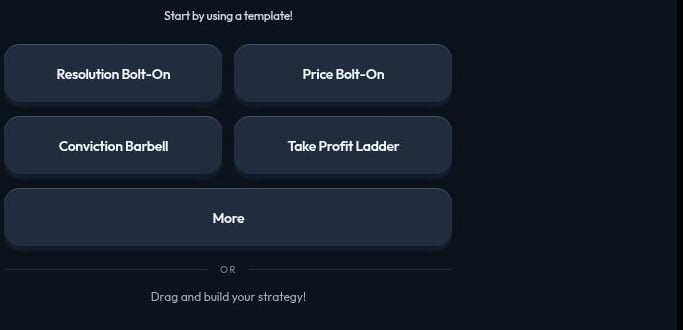
Click **New Strategy**, then choose a template instead of building from an empty canvas.
* The four quick picks apply immediately with real markets already chosen for you.
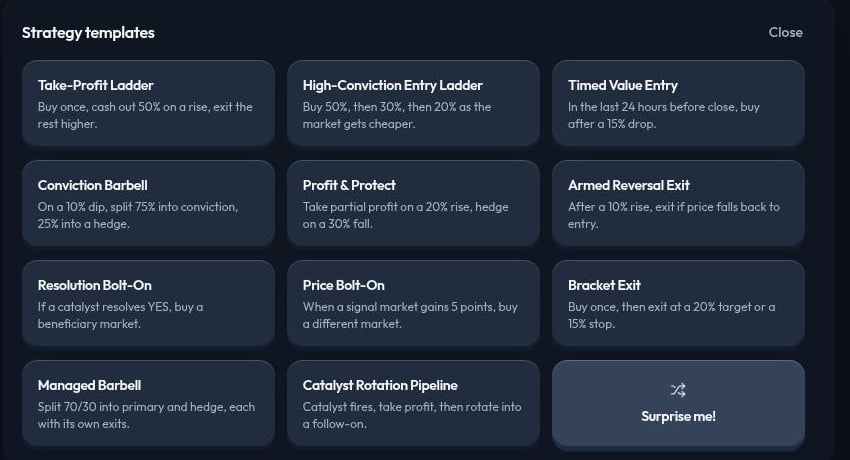
* **More** opens the full **Strategy templates** list, including **Surprise me!** for a random pick.
## Start from a template
Click **New Strategy**, then choose a template instead of building from an empty canvas.
* The four quick picks apply immediately with real markets already chosen for you.
* **More** opens the full **Strategy templates** list, including **Surprise me!** for a random pick.
 You can also skip templates and drag nodes onto an empty canvas yourself. See [Strategy builder overview](/strategy-builder/overview).
## Fill the market slots
Some templates from the full list ask you to choose the markets yourself. Drag a market from the left **Market** panel into each named slot. **Create Strategy** stays disabled until every slot is filled.
You can also skip templates and drag nodes onto an empty canvas yourself. See [Strategy builder overview](/strategy-builder/overview).
## Fill the market slots
Some templates from the full list ask you to choose the markets yourself. Drag a market from the left **Market** panel into each named slot. **Create Strategy** stays disabled until every slot is filled.
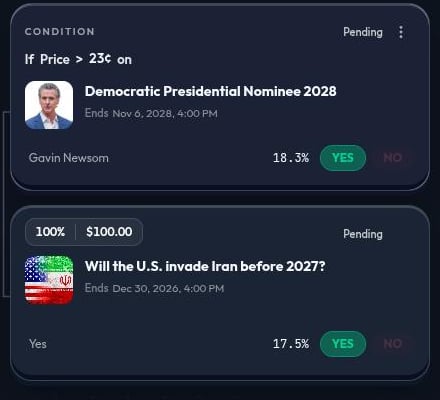
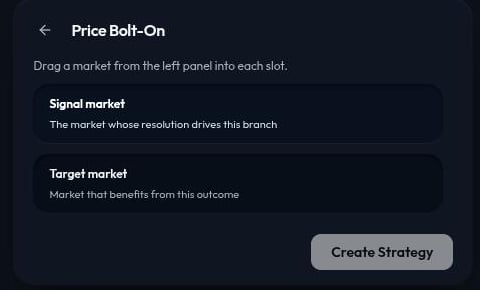 Once every slot is filled, click **Create Strategy** to build the strategy on the canvas.
 ## Template reference
| Template | What it does |
| ---------------------------- | ------------------------------------------------------------ |
| Take-Profit Ladder | Buy once, cash out 50% on a rise, exit the rest higher. |
| High-Conviction Entry Ladder | Buy 50%, then 30%, then 20% as the market gets cheaper. |
| Timed Value Entry | In the last 24 hours before close, buy after a 15% drop. |
| Conviction Barbell | On a 10% dip, split 75% into conviction, 25% into a hedge. |
| Profit & Protect | Take partial profit on a 20% rise, hedge on a 30% fall. |
| Armed Reversal Exit | After a 10% rise, exit if price falls back to entry. |
| Resolution Bolt-On | If a catalyst resolves YES, buy a beneficiary market. |
| Price Bolt-On | When a signal market gains 5 points, buy a different market. |
| Bracket Exit | Buy once, then exit at a 20% target or a 15% stop. |
| Managed Barbell | Split 70/30 into primary and hedge, each with its own exits. |
| Catalyst Rotation Pipeline | Catalyst fires, take profit, then rotate into a follow-on. |
**Surprise me!** picks a template at random, useful when you want to explore an unfamiliar pattern.
## Review before you run
A template's markets, thresholds, and allocations reflect its author's idea, not necessarily yours. Before you run a strategy built from a template:
* Replace or confirm every market, named outcome, and `YES` or `NO` side.
* Check every threshold and time window against what you actually intend.
* Confirm every allocation, especially in barbell and ladder templates that split funds across steps.
Use the [live-run checklist](/strategy-builder/validation) for the complete review before **Run Live**.
## Simulate first
Miramarket currently supports Polymarket. Use **Simulate** before **Run Live** on any template-built strategy, including the quick picks that fill markets for you. Execution and fills are not guaranteed.
## Continue learning
* [Build your first strategy](/quickstart)
* [Strategy builder overview](/strategy-builder/overview)
* [Strategy examples](/strategy-builder/examples)
* [Simulation and Live Runs](/strategy-builder/run-simulation-live)
## Template reference
| Template | What it does |
| ---------------------------- | ------------------------------------------------------------ |
| Take-Profit Ladder | Buy once, cash out 50% on a rise, exit the rest higher. |
| High-Conviction Entry Ladder | Buy 50%, then 30%, then 20% as the market gets cheaper. |
| Timed Value Entry | In the last 24 hours before close, buy after a 15% drop. |
| Conviction Barbell | On a 10% dip, split 75% into conviction, 25% into a hedge. |
| Profit & Protect | Take partial profit on a 20% rise, hedge on a 30% fall. |
| Armed Reversal Exit | After a 10% rise, exit if price falls back to entry. |
| Resolution Bolt-On | If a catalyst resolves YES, buy a beneficiary market. |
| Price Bolt-On | When a signal market gains 5 points, buy a different market. |
| Bracket Exit | Buy once, then exit at a 20% target or a 15% stop. |
| Managed Barbell | Split 70/30 into primary and hedge, each with its own exits. |
| Catalyst Rotation Pipeline | Catalyst fires, take profit, then rotate into a follow-on. |
**Surprise me!** picks a template at random, useful when you want to explore an unfamiliar pattern.
## Review before you run
A template's markets, thresholds, and allocations reflect its author's idea, not necessarily yours. Before you run a strategy built from a template:
* Replace or confirm every market, named outcome, and `YES` or `NO` side.
* Check every threshold and time window against what you actually intend.
* Confirm every allocation, especially in barbell and ladder templates that split funds across steps.
Use the [live-run checklist](/strategy-builder/validation) for the complete review before **Run Live**.
## Simulate first
Miramarket currently supports Polymarket. Use **Simulate** before **Run Live** on any template-built strategy, including the quick picks that fill markets for you. Execution and fills are not guaranteed.
## Continue learning
* [Build your first strategy](/quickstart)
* [Strategy builder overview](/strategy-builder/overview)
* [Strategy examples](/strategy-builder/examples)
* [Simulation and Live Runs](/strategy-builder/run-simulation-live)